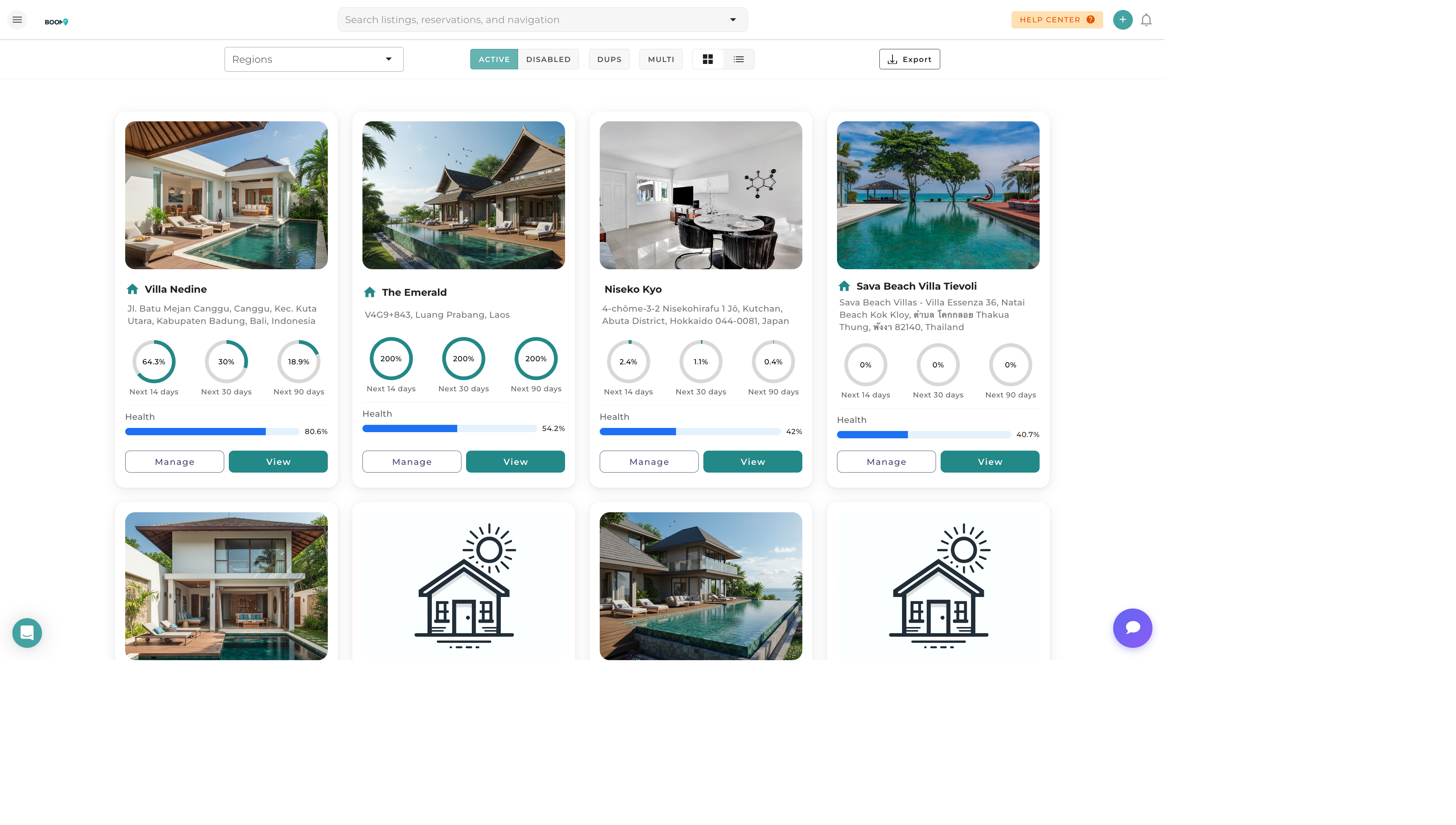
Listings Overview: View and manage all your properties in one place
Overview
The Listings page provides a comprehensive view of all properties in your portfolio. From here you can quickly access property details, see channel connections, and manage your listings.
Key features:
- View all properties in grid or list format
- Filter by status, region, or property type
- Quick access to edit property details
- See channel connection status at a glance
- Search properties by name or address
Understanding the Interface
Property Cards
Each property is displayed as a card showing:
- Property Photo - Main listing image
- Property Name - Click to open details
- Address - Location information
- Status - Active, Inactive, or Draft
- Channel Icons - Connected booking channels
Filtering Options
Use the filter bar to narrow down your property list:
- Search - Find by name or address
- Status - Active, Inactive, All
- Region - Filter by geographic zone
- Property Type - House, Apartment, Villa, etc.
Quick Actions
From the listings page you can:
- Add New Property - Click the "Add Property" button
- Edit Property - Click on any property card
- View Calendar - See availability for a property
- Manage Channels - Access channel distribution settings
Pro Tips
Use Regions
Organize properties by region to quickly filter and manage properties in specific areas.