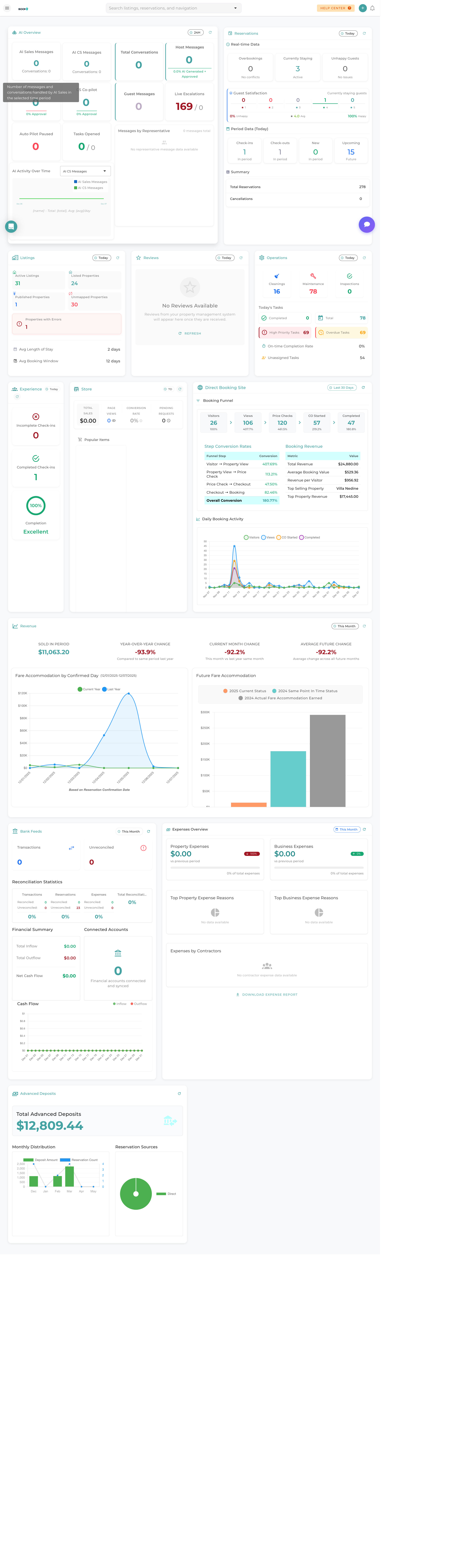
Overview
The Boom PMS dashboard is your command center for managing vacation rental properties. From here, you can monitor reservations, track revenue, manage tasks, and access all the features you need to run your property management business efficiently.
This guide will walk you through the main areas of your dashboard so you can quickly find what you need and start managing your properties like a pro.
Dashboard Areas Explained
The left sidebar is your main navigation hub. It contains all the major sections of Boom PMS:
- Dashboard - Your main overview (you are here)
- Calendar - View and manage property availability
- Reservations - All bookings and guest information
- Properties - Your property listings
- Messaging - Unified inbox for guest communications
- Tasks - Operations and maintenance management
- Financials - Revenue, expenses, and reports

Your dashboard displays important metrics at a glance:
- AI Overview - Quick access to BAM AI assistant insights
- Reservations - Today's check-ins, check-outs, and active stays
- Listings - Property status and availability summary
- Operations - Tasks and maintenance items needing attention
- Revenue - Financial performance metrics
The dashboard provides quick access to common tasks:
- New Reservation - Create a booking directly from the calendar
- Send Message - Quickly communicate with guests
- Create Task - Assign work to your team
- View Reports - Access financial summaries
Click any widget to dive deeper into that section.
Pro Tips
What's Next?
Now that you're familiar with the dashboard layout, here are some recommended next steps:
- Explore the Navigation Guide for detailed menu explanations
- Set up your User Profile with your preferences
- Follow the Quick Start Checklist to configure essential settings
- Create your First Reservation to learn the booking workflow
Was this guide helpful?
Thanks for your feedback!