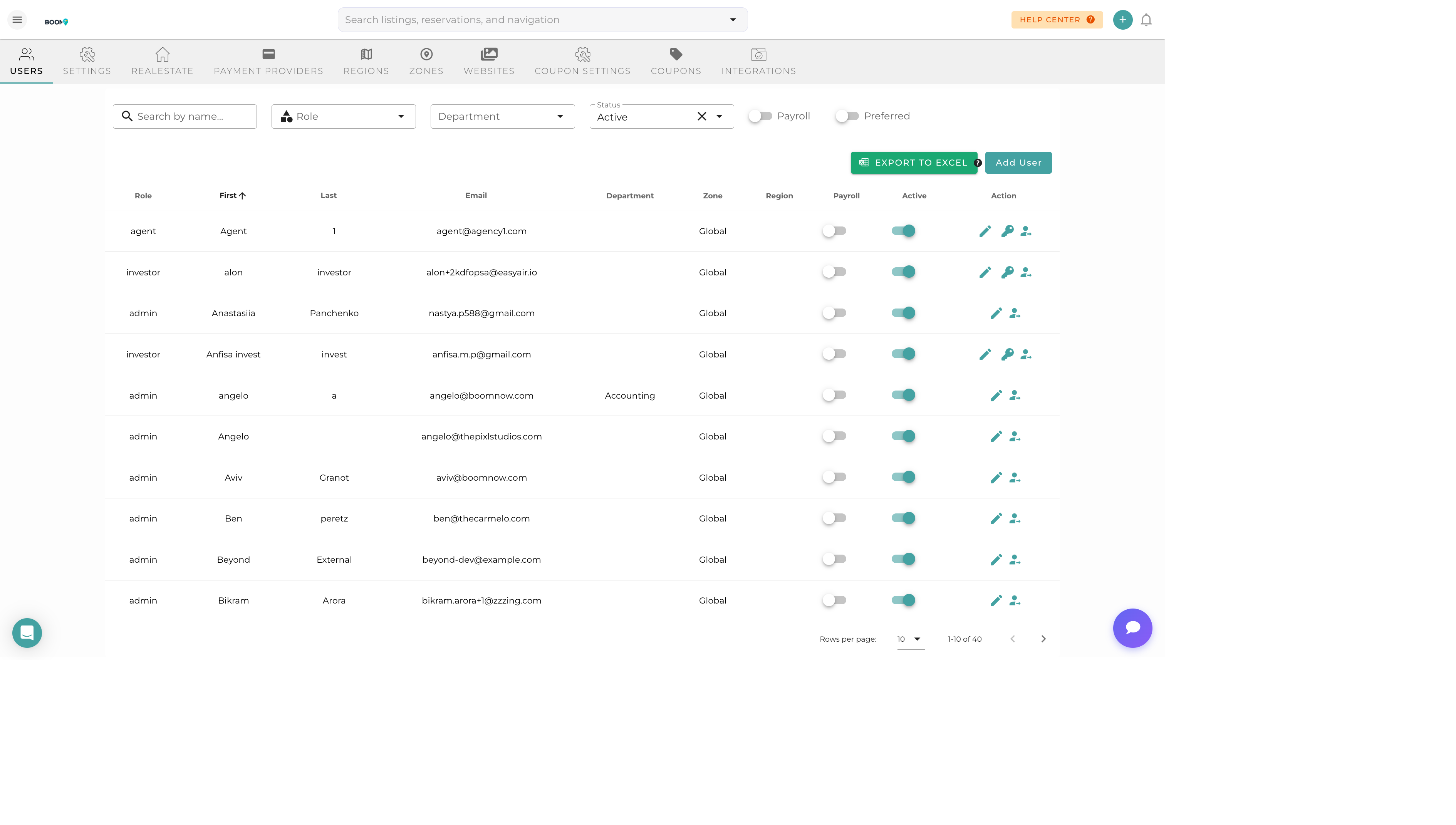
Overview
Boom PMS offers a comprehensive role-based access control system with 38 different roles to match your team structure. Each role comes with predefined permissions that determine what features and data users can access.
Roles are organized into four categories:
- Commercial Roles - Core business and management positions
- Operations Roles - Day-to-day operational staff
- External Roles - Property owners and guests with limited access
- Specialty Roles - Contractors and service providers
Commercial Roles
Core business roles for managing your vacation rental operation.
Admin
Full system access with complete control over all features, settings, users, financials, and integrations. Can access BAM AI assistant.
Property Manager
Leads property operations. Full access to reservations, calendar, guest communication, and property settings. Can manage tasks and view financial reports.
Coordinator
Administrative coordinator handling day-to-day scheduling, reservations, and guest communication. Can create and manage tasks.
Field PM
Field project manager overseeing on-site operations. Access to property details, tasks, and maintenance scheduling.
Communication Manager
Leads the communications team. Full access to messaging, guest communication templates, and automated responses.
Communication Agent
Handles guest communications. Access to unified inbox, messaging, and guest profiles.
Sales Manager
Leads the sales team. Access to reservations, pricing, leads, and sales performance reports.
Sales Agent
Handles sales operations. Can view reservations, communicate with potential guests, and process bookings.
Operations Roles
Roles for staff handling day-to-day property operations.
Hotel Reception
Front desk operations. Access to check-in/check-out, reservations, and guest information for on-site assistance.
Cleaning Manager
Leads the housekeeping department. Can assign cleaning tasks, manage cleaning schedules, and view property turnovers.
Cleaning Supervisor
Quality control for housekeeping. Can view and update cleaning tasks, conduct inspections, and report issues.
Cleaner
Cleaning staff member. Access limited to assigned cleaning tasks and property access codes.
Contractor
External contractor. Access to assigned tasks, property details needed for their work, and task completion updates.
Accountant
Financial operations. Access to financial reports, invoices, expenses, owner statements, and ledger entries.
External Roles
Limited access roles for property owners and guests.
Investor / Owner
Property owner portal access. Can view their property performance, reservation calendar, owner statements, and financial summaries. Guest contact information is masked.
Tourist / Guest
Guest booking portal access. Can view their reservations, access property information, and communicate with property management.
Specialty & Contractor Roles
Specialized roles for contractors, service providers, and specific job functions.
Management & Support
Project Manager
Oversees projects and renovations. Access to task management, property details, and project timelines.
Host
On-site property host. Access to guest information, check-in details, and property access codes.
Region Manager
Manages properties in a specific region. Access to all properties and tasks within their assigned area.
Office Manager
Office administration. Access to team scheduling, basic reporting, and coordination tools.
Customer Success
Customer support representative. Access to guest profiles, reservation details, and communication tools.
VA (Virtual Assistant)
Virtual assistant support. Limited access based on assigned tasks, typically messaging and data entry.
Realtor
Real estate agent partner. Access to property information and performance data for sales purposes.
Designer
Property staging and design. Access to property photos, inventory, and design-related tasks.
Maintenance & Service Providers
Maintenance
General maintenance staff. Access to maintenance tasks, property details, and work order updates.
General Maintenance
General handyman services. Access to assigned repair tasks and property access information.
Design Maintenance
Aesthetic and design upkeep. Access to design-related maintenance tasks and property staging.
Pool
Pool maintenance specialist. Access to pool-related tasks and scheduling.
Hot Tub
Hot tub maintenance specialist. Access to hot tub service tasks and chemical logs.
Landscape
Landscaping and grounds maintenance. Access to outdoor maintenance tasks and schedules.
Pest
Pest control services. Access to pest control tasks and treatment schedules.
Appliances
Appliance repair specialist. Access to appliance-related tasks and property inventory.
Electrician
Electrical work specialist. Access to electrical maintenance tasks and property details.
Plumber
Plumbing specialist. Access to plumbing tasks and property system information.
HVAC
Heating and cooling specialist. Access to HVAC maintenance tasks and system schedules.
Permissions Matrix
This table shows which features are accessible to the most common roles.
| Feature | Admin | Prop Manager | Coordinator | Agent | Cleaner | Owner |
|---|---|---|---|---|---|---|
| View All Properties | ✓ | ✓ | ✓ | ✓ | — | Own |
| Edit Properties | ✓ | ✓ | — | — | — | — |
| View Reservations | ✓ | ✓ | ✓ | ✓ | — | Own |
| Create Reservations | ✓ | ✓ | ✓ | — | — | — |
| View Financials | ✓ | ✓ | — | — | — | Own |
| Manage Users | ✓ | — | — | — | — | — |
| Access BAM AI | ✓ | — | — | — | — | — |
| View Guest Contact Info | ✓ | ✓ | ✓ | ✓ | — | Masked |
| Task Management | ✓ | ✓ | ✓ | — | Own | — |
| Messaging | ✓ | ✓ | ✓ | ✓ | — | — |
| Settings & Configuration | ✓ | — | — | — | — | — |
Legend: ✓ = Full access | Own = Own properties/tasks only | Masked = Partial data hidden | — = No access
Property-Level Access
Beyond roles, you can restrict users to specific properties:
- All Properties - Access to entire portfolio
- Specific Properties - Access only to selected properties
- Region-Based - Access to all properties in certain regions
Super Admin Abilities
Super Admin is a special capability that can be granted to Admin users. It provides additional cross-organization access for:
- Viewing analytics across all tenants
- Accessing advanced BAM AI configuration
- System-wide administrative functions